Handling Large Files and CRDs in Helm and the 1MB Release Limit
Helm is a fantastic packaging and lifecycle tool—until you hit one of its hardest limits:
Error: create: failed to create: Secret "sh.helm.release.v1.my-release.v1" is invalid:
data: Too long: must have at most 1048576 bytes
Helm stores release state in a Kubernetes object, and Kubernetes objects have a hard 1 MiB size limit. If your chart grows large (hello, “monster CRDs”), you can end up in a situation where helm install/upgrade fails even though nothing is “wrong” with your Kubernetes cluster.
This post explains why the limit exists, how to measure what’s consuming your release size, and several maintainer-grade techniques to stay below the 1 MiB ceiling—based on a real-world experience maintaining kube-prometheus-stack, where CRDs alone can be multiple megabytes on disk.
Why Helm releases have a size limit
Helm stores the full release information (rendered manifests, values, chart metadata, chart files, hooks, etc.) inside a Kubernetes Secret (or ConfigMap if configured).
The Secret follows the name pattern sh.helm.release.v1.<release>.v<revision> and stores the data in the .data.release key. This payload is first base64-encoded, then gzipped internally by Helm, and finally base64-encoded again to satisfy the Kubernetes Secret storage requirements.
Regardless of the encoding layers, the final Kubernetes Secret object must fit within Kubernetes’ 1 MiB object size limit (technically 1.048.576 bytes).
That means: a Helm release cannot exceed ~1 MiB, and the “effective” limit is often lower due to metadata overhead.
Why CRD-heavy charts are especially affected
In the operator ecosystem, CRDs tend to grow over time. A single CRD can be huge, and a set of CRDs can be massive. Prometheus Operator is a well-known example: the CRDs can easily exceed multiple megabytes on the disk.
And here’s the kicker: CRDs in Helm charts are special. Helm natively installs CRDs from the crds/ directory during install/upgrade, but generally does not manage them as part of the normal lifecycle (it won’t upgrade or delete them the same way it handles templated resources).
Because of this limitation, many maintainers bypass the native crds/ feature and instead use Custom Hook Jobs (templated Kubernetes Jobs) to manage CRDs manually (more on that in Technique 4).
However, whether you use the native crds/ folder or Custom Hooks, the CRD files often end up being stored in the release payload in a way that explodes the size. So you get the worst of both worlds: CRDs are large, Helm doesn’t really “manage” them (in the native case), but the release state still contains them.
Reproducing and measuring the problem
When you suspect you’re approaching the limit, don’t guess—measure.
1) Check the raw size of the stored release payload
kubectl get secrets sh.helm.release.v1.kube-prometheus-stack.v2 \
  -o jsonpath='{.data.release}' | base64 -d > release

ls -l release
In one real case (with an optional feature enabled), the stored payload was around 1.031.276 bytes with the feature enabled, and 1.025.044 bytes without it. Both are dangerously close to the 1.048.576 bytes limit.
2) Decode the release into JSON for analysis
kubectl get secrets sh.helm.release.v1.kube-prometheus-stack.v2 \
  -o jsonpath='{.data.release}' \
  | base64 -d | base64 -d | zcat - > release.json
This gives us the raw JSON data of the helm release. Then I upload the data to a JSON size analyzer:
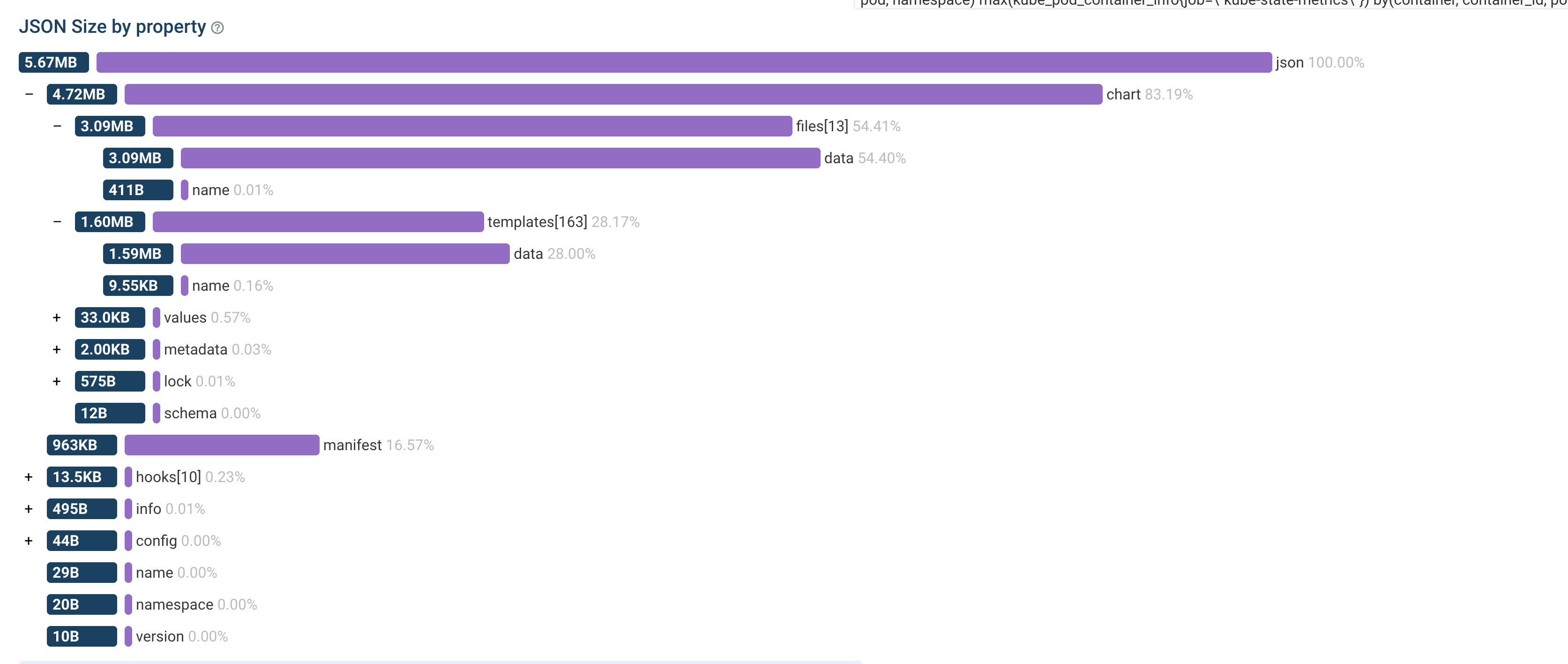
% jq -r '.chart.files[] | (.data | length | tostring) + ": " + .name' release.json | sort -n
532: .helmignore
876: CONTRIBUTING.md
8556: crds/crd-prometheusrules.yaml
24124: crds/crd-scrapeconfigs.yaml
47600: crds/crd-podmonitors.yaml
49656: crds/crd-probes.yaml
50024: crds/crd-servicemonitors.yaml
80636: README.md
360328: crds/crd-alertmanagerconfigs.yaml
565424: crds/crd-thanosrulers.yaml
600740: crds/crd-alertmanagers.yaml
674428: crds/crd-prometheusagents.yaml
773992: crds/crd-prometheuses.yaml
Techniques to reduce release size
Technique 1: Reduce documentation footprint (small win, but easy)
Helm stores chart files in the release, which can include README.md, CONTRIBUTING.md, and other large documents.
You can exclude files via .helmignore. However, this removes them from the chart package entirely. helm package uses .helmignore to filter the .tgz, which means these files won’t be visible on ArtifactHub or to users inspecting the chart.
README.md minimal and move bulk content into USAGE.md or UPGRADES.md. Then consider ignoring only the extra-large docs if you must—balancing chart usability, ArtifactHub quality, and release size.This alone usually gives only small savings (single-digit KB), but it’s low-risk and easy.
Technique 2: Minify CRDs (moderate win, higher risk)
CRDs are YAML—YAML is verbose. If you convert them to minified JSON, you can save a lot of bytes.
One example workflow:
for i in crds/*.yaml; do
  yq -o=json -I=0 "$i" > "${i/yaml/json}"
  rm "$i"
done
This dramatically reduces the release size: 1.031.276 -> 851.536 bytes.
jq -r '.chart.files[] | (.data | length | tostring) + ": " + .name' release.json | sort -n
568: .helmignore
5656: crds/crd-prometheusrules.json
15260: crds/crd-scrapeconfigs.json
26808: crds/crd-podmonitors.json
28424: crds/crd-servicemonitors.json
29220: crds/crd-probes.json
159628: crds/crd-alertmanagerconfigs.json
321280: crds/crd-thanosrulers.json
337412: crds/crd-alertmanagers.json
385084: crds/crd-prometheusagents.json
442848: crds/crd-prometheuses.json
This can yield noticeable reduction. In the kube-prometheus-stack case, it saved around 17.4%, which is a huge chunk when you’re close to the limit.
Technique 3: Move CRDs into a subchart
This is the most effective and maintainable trick I’ve seen for charts. Move CRDs out of the root chart into a dedicated subchart, for example kube-prometheus-stack/charts/kube-prometheus-stack-crds/.
Why this works
Helm releases store the chart that was installed. When using a local subchart dependency (stored in charts/), Helm flattens the templates but still carries the charts.
However, Helm treats the root chart differently regarding file inclusion rules compared to dependencies in the stored release object.
The release object structure minimizes the payload of dependencies compared to the root chart’s files map, meaning files in subcharts don’t bloat the release secret as much as files in the root chart.
This specific behavior regarding how Helm handles files in the root chart versus subcharts has been documented upstream since 2022, though no structural solution has been implemented in Helm core to date.
So by shifting CRDs into an “unmanaged CRD sub-chart”, Helm still installs CRDs on fresh installations (because they’re still in crds/), but the CRD files stop bloating the release Secret.
This can turn a nearly-1 MiB release into something comfortably small. In one case, moving CRDs to a subchart reduced the release payload from roughly 1.031.276 bytes down to 392.092 bytes. That’s a dramatic reduction and gives you back upgrade headroom for future features.
Technique 4: CRD handling through helm hooks
Some charts don’t rely purely on Helm’s built-in crds/ installation flow and instead use a pre-install / pre-upgrade hook Job that applies CRDs with kubectl apply.
This is necessary because Helm’s built-in CRD handling is very basic and doesn’t support CRD updates, lifecycle management on uninstallation, or templating.
If you do that, subchart-only may not be enough. Because the CRD files need to be included as ConfigMap for the hook to work.
While files in the crds/ directory aren’t included in the release, files in the templates/ directory are.
So you may end up with a situation where CRD files are in the root chart’s templates/ directory causing the release size to explode.
Even moving them to a subchart’s templates/ directory might reduce the size, but you still need to ensure the hook can find and apply them.
A pragmatic trick is to store CRDs as a compressed archive in the chart, and decompress at runtime in the hook job.
Why bother, doesn’t Helm already gzip?
Helm does gzip the release object, but the math favors pre-compression. Helm gzips the entire release payload, which includes base64-encoded file contents. Since base64 encoding inflates data by ~33%, Helm is often compressing a larger blob than necessary.
By compressing a 1 MB text file into a ~100 KB bz2 binary yourself, you drastically reduce the input size before it ever hits Helm’s encoding pipeline.
Even though Helm will base64-encode your binary archive (growing it slightly to ~133 KB), the final impact on the release size is far smaller than letting Helm handle the raw text.
Why bz2?
bz2 is surprisingly effective for large YAML/JSON CRDs. Other options have trade-offs: xz compresses better, but creating binary-identical archives across macOS and Linux is incredibly challenging.
This breaks CI pipelines that check for changes via git diff to ensure the committed binary matches the source (a critical security check to prevent malicious code injection). Additionally, zstd often isn’t available in minimal images.
The main reason to choose bz2 is that standard busybox images (commonly used for init containers and alpine just based on busybox) include bunzip2 by default.
This enables a common, robust pattern: use an initContainer with busybox to decompress the archive, sharing the volume with a standard kubectl container that applies the CRDs.
This keeps the hook job small, portable and reproducible.
To see a real-life example of this technique in action, check out the implementation in the kube-prometheus-stack chart.
Once zstd becomes more universally available in minimal images, it may be worth revisiting the compression choice for even better ratios.
Technique 5: Fetch CRDs from upstream (Variant of Technique 4)
This approach is effectively a modification of Technique 4. You still use a Hook Job (pre-install/pre-upgrade) to manage the CRD lifecycle, but instead of bundling a bz2 archive inside the chart, you fetch the CRDs dynamically from an upstream source or the operator image itself.
This removes the CRD payload from the release entirely, but the hook mechanism remains mandatory.
1. Can the operator binary print its own CRDs?
Some operators (like Velero) include a CLI command to output their own CRDs. This allows your Helm hook to simply pull the operator image (which is already part of your chart) and run a command to apply CRDs.
For example, Velero’s Helm chart uses a hook that runs:
velero install --crds-only --dry-run -o yaml | kubectl apply -f -I successfully advocated for this approach with the Prometheus Operator maintainers as well (see issue #7270), proving that upstream projects are often open to these improvements to help their ecosystem.
This method is self-contained: since your chart already requires the operator image to run, you aren’t adding a new external dependency—you’re just reusing an existing one to generate the CRDs.
2. Can they ship CRDs as an OCI Artifact?
With Kubernetes 1.35+, the Image Volume feature allows you to mount an OCI image directly as a volume.
If the upstream project publishes a dedicated “CRD image” (containing just the YAML files), you can mount that image into your hook job and kubectl apply the files directly from the mount path.
Trade-offs vs. Technique 4:
Technique 5 replaces the bundled bz2 archive from Technique 4 with dynamic generation/fetch, but the mandatory hook job remains.
- GitOps Compatibility: For tools like FluxCD and ArgoCD to perform native CRD management, the CRDs must be present in the chart artifact (as in Technique 3). They cannot “see” CRDs that are generated dynamically inside a hook.
- Dependencies:
- Method 1 (Operator CLI): Remains self-contained (air-gap friendly) as long as you have the operator image.
- Method 2 (OCI Image): Requires pulling a separate CRD image, which must be mirrored for air-gapped environments.
Practical guidance: what I’d recommend as a maintainer
If you maintain a chart and are hitting (or nearing) the limit, start by measuring your release usage by decoding the release and inspecting .chart.files.
Once you have the data, try the structural fix first: move CRDs into a dedicated subchart as this often yields the biggest win with low risk. You should also trim documentation bloat by keeping README.md lean and splitting content into USAGE.md or UPGRADES.md. If you use a hook-job-based CRD installer, consider shipping CRDs as a bz2 archive and decompressing/applying them at runtime.
This combination is usually enough even for very large CRD suites.
Closing thoughts
The 1 MiB Kubernetes object limit isn’t going away—and Helm releases live inside Kubernetes objects. So for chart maintainers, the right mindset is to treat release size as a real constraint, assume CRDs will grow, and design chart structure so CRDs don’t bloat the release state.
There have been attempts to fix this upstream, such as the 2022 proposal HIP 0013: Support Helm release data stored in multiple K8s Secrets or discussions around changing the compression algorithm. However, these initiatives haven’t seen significant progress. Until such architectural changes land in Helm core, the limit remains a hard constraint that chart maintainers must work around.
If you maintain operator-style charts, you’ll likely hit this sooner or later. The good news is that with a few structural tricks (especially the subchart approach), you can keep your releases healthy and future-proof without sacrificing UX or maintainability.